Object Systems
Lecture 1
Date Taken: Fall 2025
Status: Completed
Reference: LSU Professor Daniel Donze, ChatGPT
Summary
An Operating System (OS) is the essential software that enables a computer to function. It manages hardware resources, provides services for applications, and offers an interface for users. Tasks include process scheduling, memory allocation, file management, device control, and security. Examples include Windows, macOS, Linux, Android, and iOS.
What's Covered?
- Computational History
- Operating System Design
- Operating System Theory
- Historical Architectures
Computer History
Computational Hardware Timeline
1945 - Mechanical computations using gears and levers.
1945-1955 - Vacuum tubes enabled early electronic calculations.
1960 - Transistors replaced vacuum tubes, increasing efficiency and reliability.
1970 - Integrated Circuits (ICs) brought miniaturization, faster processing, and reduced costs.
1980 - CPUs became the "brain" of computers, managing instructions and data flow.
Enigma Machine (1930)
- Used during WWII for encrypting and decrypting secret messages.
- Featured rotors that changed electrical connections to create complex ciphers.
Electronic Numerical Integrator and Computer (ENIAC)
- Designed to calculate bomb trajectories.
- Contained ~18,000 vacuum tubes.
- Performed 5,000 operations per second.
- Programmed using punch cards.
UNIVAC & IBM 701 (1950s)
- UNIVAC: First commercially available computer used for census, weather, and military applications.
- IBM 701: Competitor to UNIVAC, similar computation power, released in 1952.
Atlas (1960s)
- Among the first supercomputers, developed by the University of Manchester and Ferranti.
- Used for weather forecasting, nuclear simulations, and scientific research.
- Introduced virtual memory.
PDP Series and Early Innovations
- PDP-7: Early minicomputer, Unix was developed here.
- Apollo Program: Guided spacecraft navigation and control.
- Batch Processing Systems: Early OS that processed jobs without user interaction.
- Multics (1964-1969): Introduced hierarchical file systems and dynamic linking.
- PDP-11: Supported Unix, C language development, and multiple operating systems.
- UNIX (1969): Portable, multitasking OS written in C after Version 4. Introduced pipes and plain-text configuration.
- VAX (1977): Digital Equipment Corporation’s line supporting VMS OS with virtual memory.
- Xerox Alto (1970s): Early PC introducing the GUI, influencing future desktop metaphors.
- Altair 8800 (1970s): Sparked the personal computer revolution.
- IBM PC (1981): Standardized x86 architecture and ran MS-DOS.
- Commodore 64 (1982): Affordable home computer with a rich software library.
- Macintosh (1984): Introduced user-friendly GUI and mouse-based interaction.
- 1990s: Internet and WWW transformed computing—Windows 95, Mac OS 8, and Linux marked modern OS development.
Modern Operating System
Modern OS are large, complex and imperfect and they also contains millions lines of code which will have bugs.
They don't always run in order and often need to work with old programs.
Knowing and understanding the basic compuyer hardware help greaty because they depend on hardware.
A big part of what an OS does is managing input and output (I/O), since computers use many devices.
Modern computers also have a lot of "smart hardware," meaning devices that do some of the work themselves.
Operating System Theory
An OS manages hardware and software resources, ensuring stability and efficiency. Key concepts include:
- Interfaces and Structure - The OS is like a middleman between the computer hardware and the people/programs using it. It offers different ways to interact:
- Command Line (CLI) - A text-based way to talk to the OS (example: typing commands into Bash on Linux).
- Graphical User Interface (GUI) - A visual way to interact (example: using folders and windows in Window Explorer)
- Hardware Protection and Management - Hardware like CPU, memory, and devices is powerful but dangerous if uncontrolled. The OS acts as the guard:
- Device Drivers - small software pieces that let the OS communicate with hardware like printers, keyboards, or network cards.
- Interrupt Handing - When a hardware wants attention, like a keyboard press or a network message, it sends a signal called an interrupt. The OS pauses what it's doing to handle the event.
- Modes of Operation - User Moder, where normal programs run with limited power (can't break things). Kernel Mode, where the OS runs with full power over the system. The OS switches modes as needed, example, the prgram request help the OS jumps into kernel mode, does the task then returns control.
- Process Management - A process is a prpgram in action not just code, but code and resources like memory and files. The OS:
- Creates and destroys processes as you open/close programs
- Schedules Processes - since many want the CPU at once, the OS decides who gets to run and for how long.
- Suspends and Resume Processes - for example, when a program is minimized, it can be paused to save resources.
- Process Synchronization - ensures multiple processes don't interfere with each other (ex. two apps writing to the same file at once).
- Interprocess Communication (IPC) - Allows processes to exchange information safely.
- Memory Mangement - Program need memory (RAM) to run. The OS manages this like a hotel manager assigning rooms:
- Kernel-level Allocation - Memory for the OS itself
- Prcoess-level allocation - Memory for each process
- Virtual Memory - Tricks programs into thinking they each have the whole memory space. In reality, the OS maps these requests to physical memory and even uses disk space when RAM is full (called swapping).
- Storage Mangement - The OS organizes data on hard drives and SSDs so that users can store and retreive files easily.
- Caching - Keeps frequently used data in faster memory to speed things up.
- Free Space Management Keeps track of which parts of the sidk are empty or used
- Filesystems - Structures that define how files are stored and named (ex. NTFS, ext4).
- File Operations - Create, delete, rename, read, write, open, and close files.
- Directory Mangement - Handles folders so files are organized in a tree-like system.
- Filesystems - The OS manages how data is stored and organized on storage devices (hard drivers, SSDs, USBs).
- Support For Multiple Filesystems - Different operatign systems and devices use different formats (ex. NTFS for Window, ext4 for Linux, FAT32 for flash drives). The OS can handle several of these so you can plug in different devices and still access your data.
- File and Directory Management - The OS lets you create, delete, and rename files and folders. Directories (folders) provide structure, keeping files organized in a tree-like layout
- File Operations - Programs don't directly touch storage hardware. Instead, they ask the OS to open, close, read, or write files. This ensures consistency, security, and prevents corruption.
- Networking - Modern systems rely heavily on networks. The OS manges:
- Device Drivers - for network hardware like Ethernet cards ir Wi-Fi adapters.
- Protocol Stacks - Like TCP/IP that handle how data is packaged, sent, and received reliably across networks.
- Without the OS managing the network stack, programs would have to deal with the messy details of data transfer themselves.
- Virtualization - The OS can act like a host, allowing multiple "virtual computers" (virtual machines) to run on the same physical computer
- Each VM behaves like it has its own OS and hardware, even though they are sharing.
- This is useful for testing, running multiple OSs at once, or isolating workloads.
- Security - Since the OS controls everything, it's also responsible for keeping the system safe:
- Secure Boot Makes sure the system only starts with trusted code.
- System Integrity - Prevents tampering with core parts of the OS.
- Malware Reistance and Detection - Guards againts viruses, worms, and malicious software.
- Authentication - Makes sure only the right people log in (username, password, biometrics).
- Encyprion - Protects data from being read if it's stolen or intercepted.
Structure of an OS
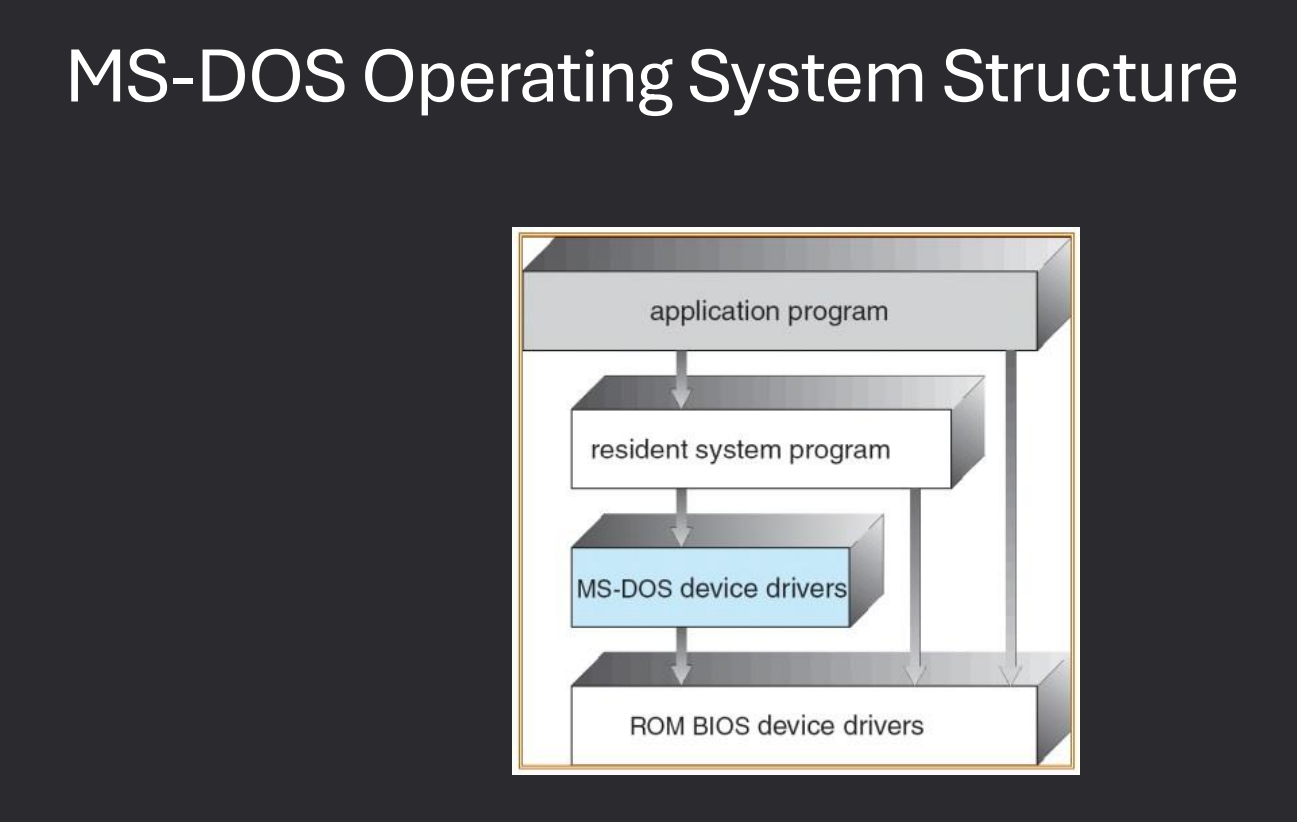
- Ealry operating systems, like MS-DOS, had very simple designs with no clear seperation between user programs and the operating system
- Everything ran at the same privilege level: There was no strict distinction between user mode (restricted) and kernel mode (full control). Any program had the same access rights as the OS itself.
- Problem: If a program had a bug, it could easily crash the entire system. If a program was malicious, it could directly interfere with the OS and take over the computer.
- Because of this, early OS designs were fast and simple, but also unstable and insecure compared to the modern systems that enforce privilege seperation.
MS-DOS Operating System Structure
MS-DOS (Microsoft Disk Operating System) was one of the earliest and most widely used operating system for IBM-compatible PCs in the 1980s and early 1990s.
It is considered a structure-less OS because it did not separate user programs from the operating system itself.
Early OS for IBM PCs, known for its simple command-line interface.
Replaced by Windows in the 1990s.
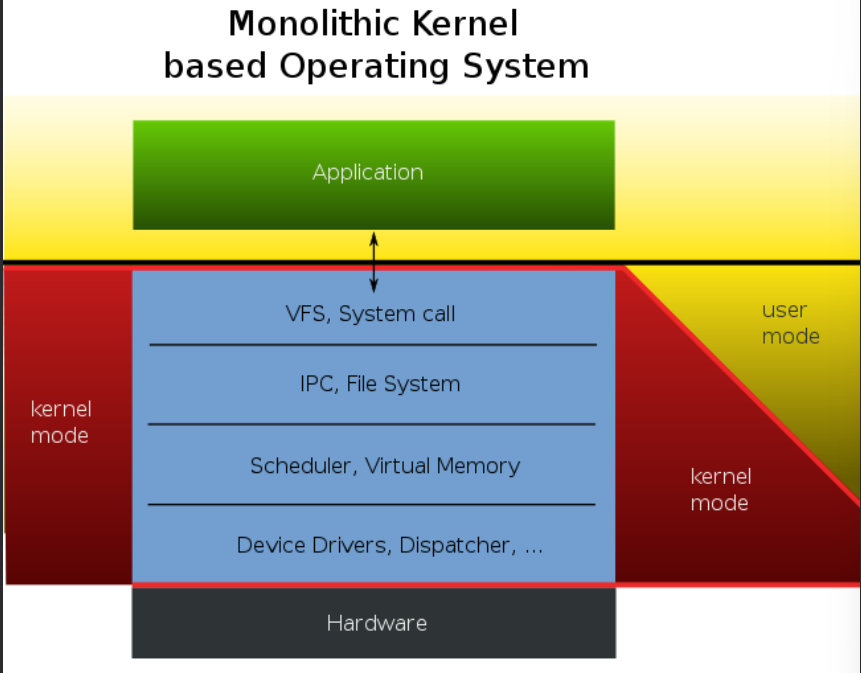
Monolithic Kernel
A monolithic kernel is one of the most common operating system structures.
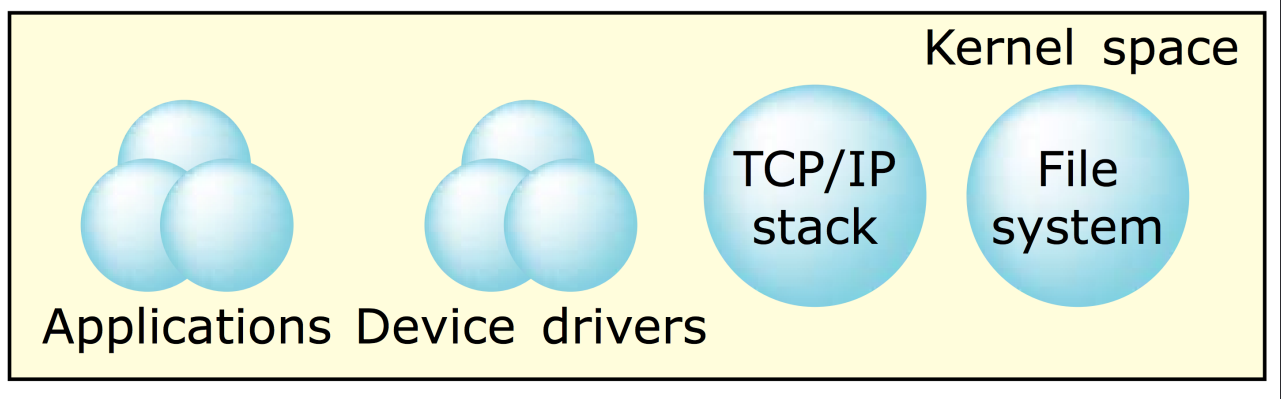
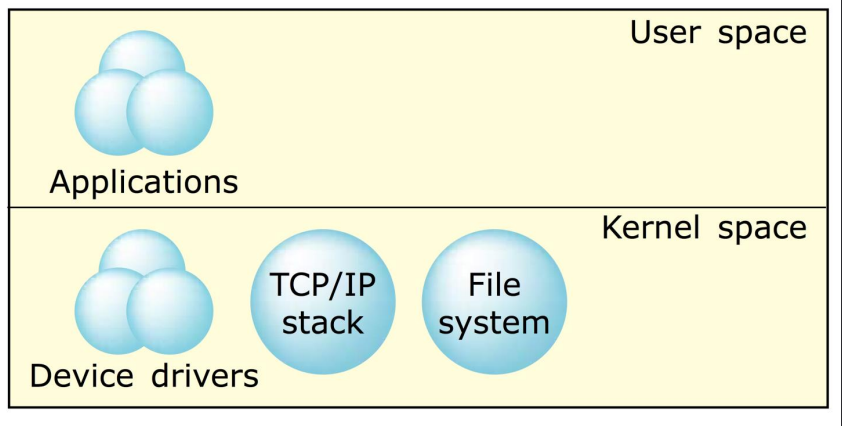
In this design, most of the operating system's core service like memory management, process scheduling, device drivers, and file systems all run together in kernel space.
- Kernal Space - The privilege area where the operating system's core components run. Has full access to the hardware and system resources. Contains process management, memory management, device drivers, file system management, and system call handling.
- User Space - Where user programs and applications run. Has limited privileges and cannot directly access hardware. Needs ro communicate with the kernel to perform tasks like reading a file or sending data to the network.
- System Calls User applications interact with the kernel through system calls. Example: when you open a file in a program, the request foes from user space -> system call -> kernel space -> hardware -> back to the program.
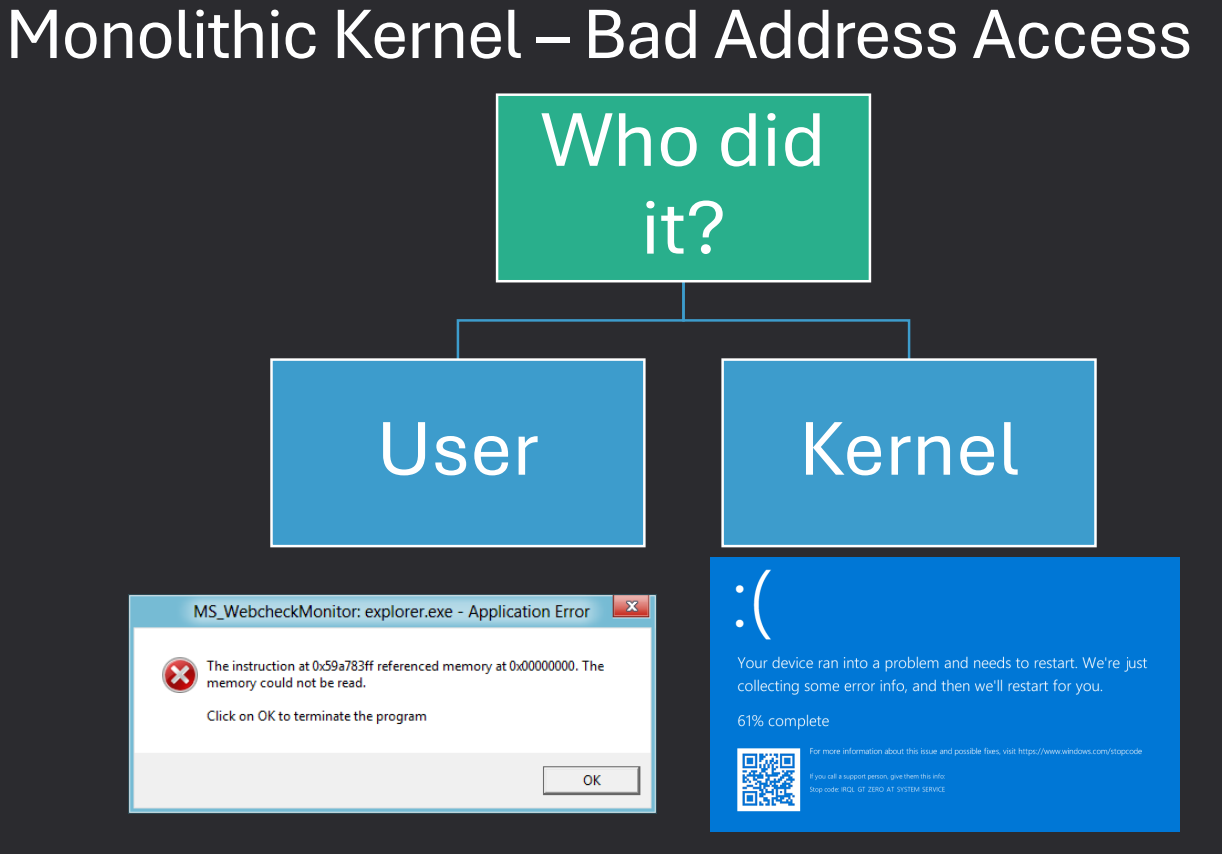
- All-In-One Kernel - In a monolithic design, almost everything the OS does runs inside the kernel (process management, file systems, networking, device drivers). This gives high performance because everything is in one place, but it also means that bugs or crashes in one part like a faulty driver can crash the entire system.
- User space interacts with the kernel through System Calls. Examples: Windows, Linux
Advanatges: fast performance, no extra layervs between kernel compenents. Effcient communication, all kernel services run in the same memory space, so switching between them is quick. Disadvantages, less stable, a bug in a single kernel component like a driver can bring down the whole system. Harder to maintain, since everything is packed together, making changes can be complex
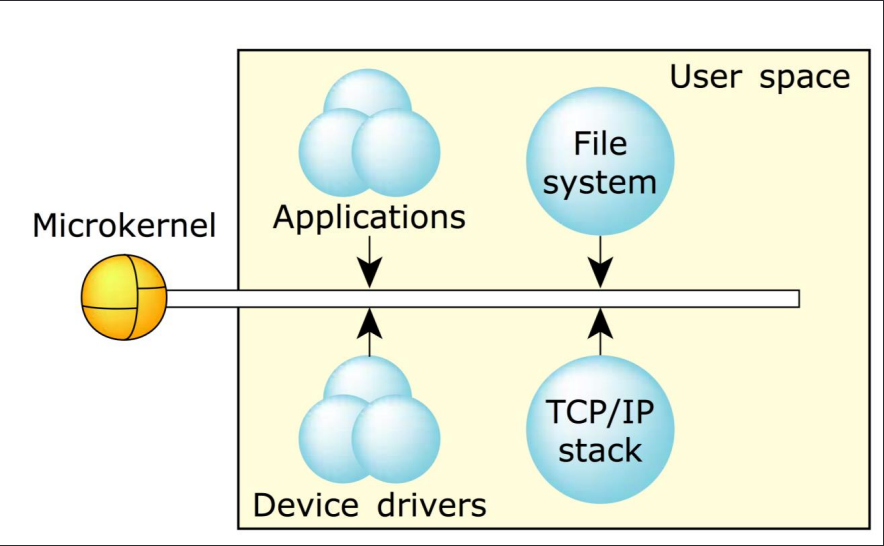
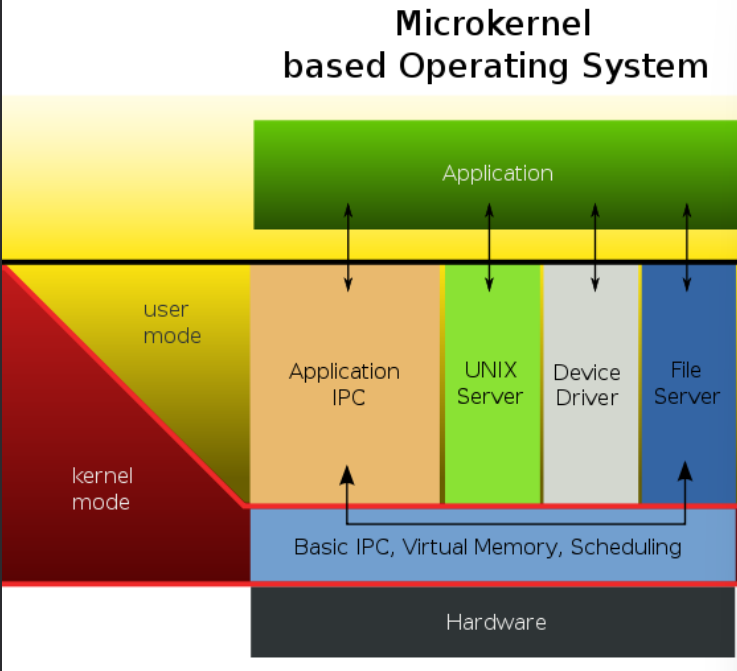
Microkernel
A microkernel is an operating system design that moves most of the operating system's services out of the kernel and into user space, keeping the kernel itself as small and simple as possible.
- Minimal Kernel - The kernel onlu handles the most essential tasks, such as: managing memeory, handling communication between processes, managing CPU scheduling. All other services like device drivers, file systems, and networking, run in user space
- User Space OS Services - Device drivers, file systems, and other OS componenets rn as normal user-space processes. This separation improves stability, because a crash in a driver won;t crash the entire system.
- Extensibility - It is easier to add or update OS services without chaning the kernel. Example, adding support for a new device driver does not require modifying kernel code.
- Overhead - Moving services to user space introduces extra communication overhead between user-space services and the kernel. This can make some operations slightly slower compared to a monolithic kernel.
- Examples: Mach, Qnx
Advantages, Better stability, failures in user-space services don't crash the whole system. Easier to maintain and extend, adding or updating services is simpler. Security, faults in user-space components are isolated, redicing system-wide risks. Disadvantages, performance overhead, extra communication between kernel and user-space services can slow some operations. More complex design, requires caredul design of communication mechanisms and service interactions.
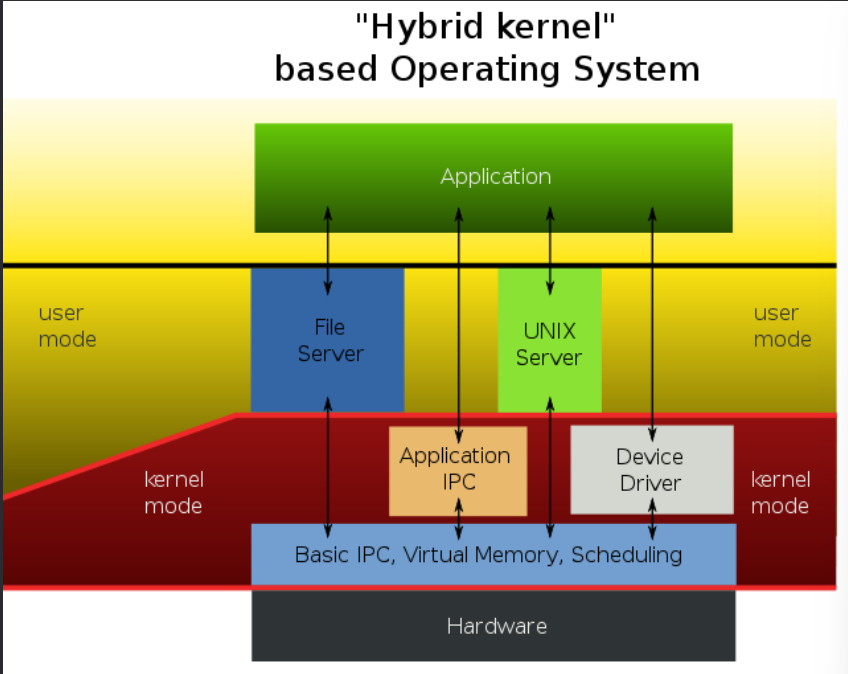
Hybrid Kernel
A hybrid kernel is a type of operating system structure that combines elements of both monolithic kernels and microkernels.
It tries to take the best parts of each approach while avoiding their weaknesses.
Example: MacOS and IOS, Android, Window NT
- Mixed Design - Core functions like memory management and process schuleing run in kernel space like monolithic kernels. Other services, such as device drivers or certain subsystems, mau run in user space like microkernels
- Flexibility - Developers can decide which components stay in the kernel and which are pushed to user space. This balance allows for boyj performance and stability.
- Performance and Stability Tradeoff - By keeping critial services in the kernel, hybrid systems avoid the heavy communication overhead that mircrokernels sometimes suffer from. By isolating other services in user space, they gain stability and security similar to microkernls
Advantages, balanced approach, combines performane of monolithic kernels with safety of microkernels. Adaptable, OS designers can customize what runs where, depending on system goals. Modern standard, most modern operating systems are hybrids, even if they lean heavily toward one side. Disadvantages, complexity, Hybrid kernels are harder to design and maintain because they mix two models. Hybrids still inherit some weaknesses from both approaches.
Loadable Kernel Modules
Modern OS (Windows, Mac, Linux) support the ability to add or remove parts of the kernel dynamically. These components are called Loadable Kernel Modules (LKM).
- Dynamic Loading - LKMs allow certain parts of the operating system, such as device srivers or subsystems, to be loaded into the kernel only when needed. This avoids the need to include every possible component in the kernel at boot time.
- Flexibility - Administrators or the OS itseld can load or unload modules without rebooting the system. Makes the OS more adaptable and easier to maintain
- Types of Components - Device drivers, Add support for new hardware (printers, graphics cards, network cards). File systems, Enable new ways of storing and managing data. Networking modules Add protocols or features to the network stack. Other kernel services that don't need to always run.
Advantages, Reduced memory usage: Only load components when needed. Improved modularity: Kernel stays smaller and easier to maintain. Ease of updates: Drivers or modules can be updated independently from the OS kernel.
Reak-Time Operating System
A real-time operating system is designed to execute tasks within strict timing constraints.
Unlike regular operating systems that focus on throughput and fairness, RTOS prioritize predictable timing and deadlines.
- Hard RT - Deadline must be strictly met. Missing a deadline can lead to serious consequences, such as system failure or physical damage (ex. Airplanes, Cars, Robotics)
- Soft RT - Deadlines should be met, but occasional misses are tolerated. Performance is still prioritized, but failures are not catastrophic.(ex. Video Streaming, Online Gaming, Multimedia)
Device Operating Systems
Operating systems are designed differently depending on the type of device they run on.
Each device has unique challenges, performance goals, and user needs, which influence how the OS is structured and what features it prioritizes.
- PC/Laptop - Focus on multitasking, user-friendly interfaces, and compatibility with a wide range of software and hardware. Examples: Windows, macOS, Linux
- Phone/Mobile Devices - Prioritize battery efficiency, touch interfaces, security, and app management. Examples: Android, iOS
- Embedded Devices - Optimized for specific tasks with limited resources. Often run real-time operating systems (RTOS) to meet timing constraints. Examples: Smart thermostats, printers, industrial controllers
- Distributed Systems - Coordinate multiple computers or nodes to work together as one system. Focus on network communication, fault tolerance, and resource sharing. Examples: Cloud servers, cluster computing systems
- Real-Time Systems - Guarantee tasks are executed within strict timing constraints. Focus on predictability and low-latency responses. Examples: Airplanes, robotics, automotive systems
OS design adapts to the hardware and use case.
Each device type requires the OS to balance performance, efficiency, and reliability differently.
Understanding the target device is crucial when designing, analyzing, or using an operating system.